Skip to content
Fig platform · respond

Agentic RemediationConnected to the bigger picture.

Use guided remediation to turn findings into assigned actions while keeping human approval, ownership and evidence intact.

Professional working at a laptop
What this means for your team
  • Suggest next actions from context.
  • Assign remediation to owners.
  • Verify and evidence completion.
The practical difference

Move from finding to fix without losing control.

A control fails on Tuesday. An alert lands in an inbox. By Thursday, someone creates a ticket. The following week, an engineer investigates. Three weeks later, the fix is applied, but nobody updates the compliance register and the auditor finds the gap six months on.

01

Governed Remediation

A configured control failure can create a task, assign an owner and propose a response. Supported actions may execute only within approved policies, integration permissions and target allowlists; record the outcome and verify the result.

02

Voice-Driven Remediation with Martin

Martin, Fig Group’s voice-enabled AI agent, gives authorised teams conversational access to remediation workflows. Read-only queries execute immediately, reversible actions require confirmation, and medium-risk changes require independent approval before execution.

03

Configured Playbooks

For supported integrations, playbooks can create incidents, notify owners or call approved tools. Script execution, verification and escalation depend on the configured action, permissions and returned result.

04

Tamper-Evident Audit Trail

Every automated action captures the trigger, policy authority, target, approvals, timestamps, and outcome. When an auditor asks who changed what and why, the answer is already there.

Inside Fig

See the work.
Keep the evidence.

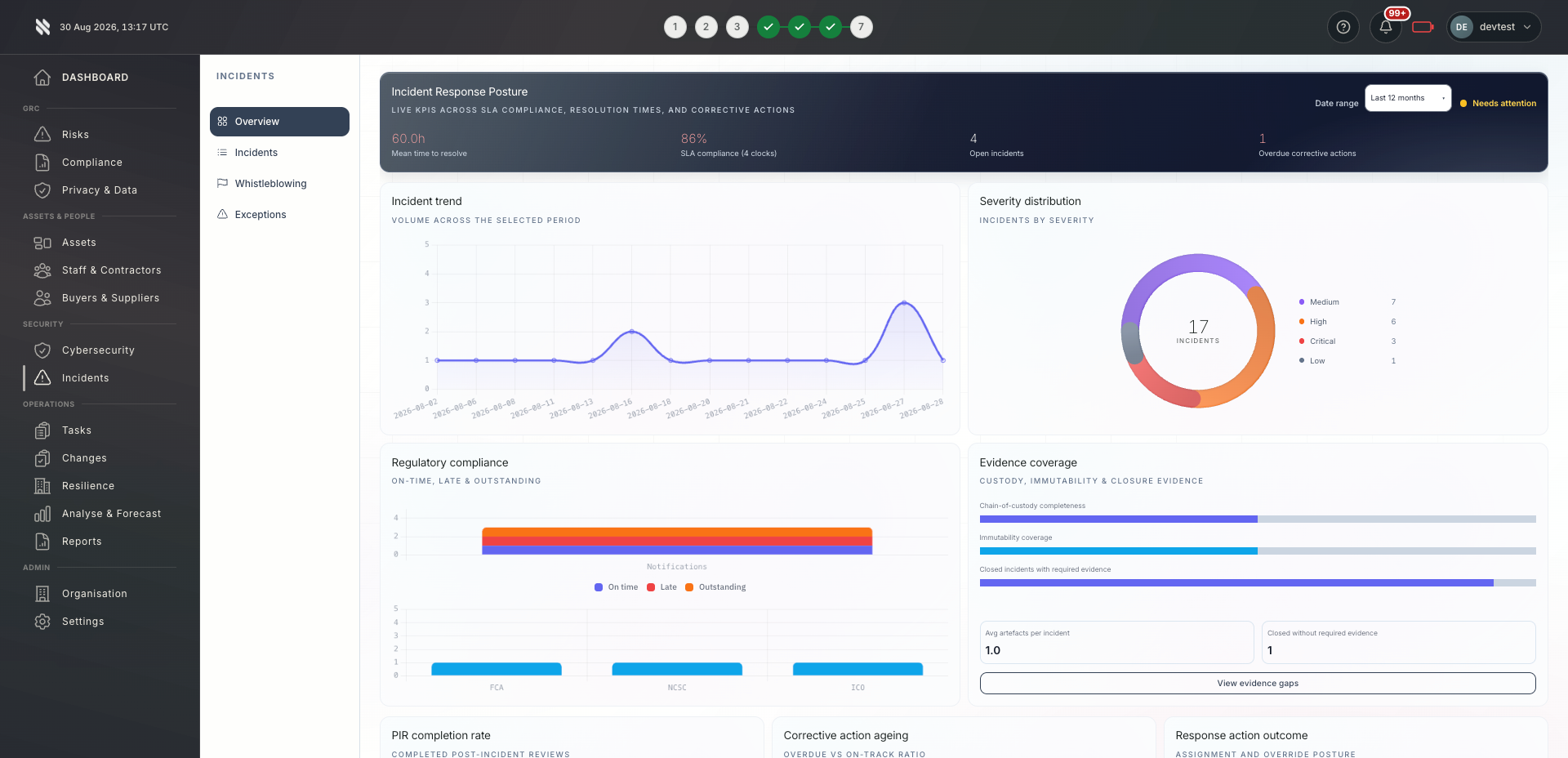
This incident response view shows the wider Fig environment. Ask us to demonstrate agentic remediation against your own requirements.

A tailored walkthrough lets you review the relevant workflows, supported connections and reporting before deciding whether Fig is right for your team.

See it in a demo
Fig incident response overview showing incident trends, severity, regulatory notifications and evidence coverage
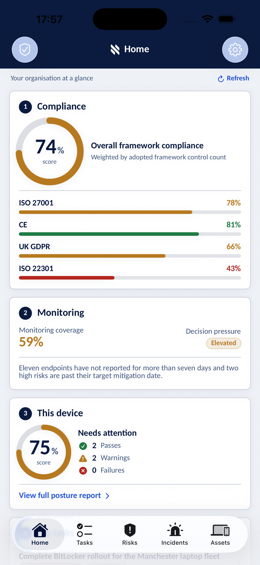
Fig mobile app Home screen showing framework compliance, monitoring coverage and device posture
Fig platform · Incident response
Built around your role

One platform. Different responsibilities.

Bring delivery, oversight and assurance together without losing sight of who owns the next action.

Colleagues working together with laptops in an office

MSPs & MSSPs

Configure playbooks separately for each client and supported target. Review approvals, failures and exceptions where automation cannot safely complete the work.

Explore Fig for MSPs
Business team discussing shared priorities

In-house teams

Control failures can create tracked remediation. Supported hard controls can hold or block configured operations, and validated playbooks can execute approved actions under policy.

Explore Fig for organisations
Reviewing business records and supporting documentation

Compliance & audit teams

Every remediation step is linked to the triggering control, the governing policy, the approval path, and the final outcome. That gives auditors a complete evidence chain from failure through correction and verification.

Discuss your requirements
A considered start

Evaluate the fit. Then agree the rollout.

Start with the outcomes you need. We will discuss scope, delivery and commercial terms with you before you commit.

  1. 1

    Tell us what matters

    Discuss your current approach to agentic remediation, the teams involved and the requirements you need to meet.

  2. 2

    Review the workflows

    See the relevant features in a tailored demonstration. Confirm integration coverage, responsibilities and any configuration needed.

  3. 3

    Agree your next step

    Review the proposed scope and pricing. Set implementation priorities, ownership and review points around your organisation or client portfolio.

Platform functionality and automation depend on the agreed scope, configuration and connected systems. Software supports your compliance programme; it does not replace an independent assessment or guarantee certification.

Before you decide

Your questions, answered.

Need to discuss a specific requirement or client scenario?

Speak to Fig
Can automated actions make changes to our production environment without approval?

That depends on your configuration. By default, actions that modify state require human approval. You can selectively enable automatic execution for validated playbooks, approved action types, and defined targets. Nothing runs outside your configured allowlists.

What happens if an automated remediation fails?

A supported playbook records the attempt and result and can route a failure to a human operator. Check integration responses and the target state; an attempted action is not a verified fix.

How does Martin handle permissions?

Martin operates under the caller’s actual RBAC role. If the caller cannot perform the action in the web interface, Martin cannot do it on their behalf. Medium-risk actions require a second approver, and high-risk or out-of-scope actions are blocked entirely.

Can we disable specific types of automated remediation?

Yes. Every consequence type, playbook, escalation path, and just-in-time response is independently configurable. You can run in monitor-only mode and enable enforcement incrementally as you build confidence.

Does this work with our existing tooling?

Yes. Fig Group governs and orchestrates your existing tooling rather than replacing it. Playbooks can call RMM, PSA, identity, cloud, backup, and security tooling via integration or webhook, then capture the full outcome in the same audit trail.

Take the next step

See how agentic remediation could work for you.

Tell us what you would like to achieve. We will arrange a relevant conversation about the platform, your requirements and the right next step.

  • A walkthrough focused on your priorities
  • Clarity on scope, connections and delivery
  • A discussion of pricing for your requirements

Speak to Fig

Tell us what you need. We’ll help you take the next step.

A brief message is all we need to get started.