Structured Workflows
Every incident follows a defined response playbook with step-by-step checklists, approval gates, and automated escalations. Nothing is forgotten.
Manage response actions, owners, decisions, notifications and reporting from one structured incident record.

Incidents are logged in Slack, email, or spreadsheets. Evidence disappears. Regulatory notification deadlines are missed. Post-incident reports never capture the full timeline.
Every incident follows a defined response playbook with step-by-step checklists, approval gates, and automated escalations. Nothing is forgotten.
All incident actions, communications, system logs, and decisions recorded in a shared investigation workspace. MSPs and clients collaborate from the same evidence timeline. Automatic evidence packs for regulatory review and law enforcement.
Regulatory notification timelines calculated automatically based on incident classification and jurisdiction. Reminders trigger with required disclosure content pre-filled.
Automated timeline generation, root cause tracking, and remediation recommendations. Findings linked back to preventative controls. Includes tabletop exercise planning and execution for NIS2 and DORA compliance.
Fig Group supports the coordination and evidence trail of an incident: intake, triage, assigned actions, decisions, recovery and learning. Agree response authority and escalation routes before an incident, and keep an accessible fallback plan if your usual systems are unavailable.
Name an incident lead, technical responders, a communications owner, a privacy or legal contact and an authorised decision-maker, with deputies. Define intake and triage, containment approvals, investigation, recovery checks and post-incident review. Agree client and supplier responsibilities where an MSP coordinates the response.
Keep a timeline with observation and awareness times, affected assets, action owners, decision reasons and references to preserved evidence. Restrict access appropriately and record collection context. Agree which information can be shared with clients and how responders will work if the primary workspace is unavailable.
No. The responsible organisation must assess its reporting duties and record the decision. Under UK GDPR, a controller must notify the ICO without undue delay and within 72 hours of awareness unless a personal data breach is unlikely to risk individuals’ rights and freedoms. Processors must inform their controller without undue delay. Other duties can have different thresholds and timescales; confirm them with the responsible adviser.
In a fictional compromised-mailbox exercise, the incident lead assigns investigation and containment, records when the organisation became aware and asks the privacy owner to assess affected data. Recovery requires a documented check. A missed deputy contact becomes an owned improvement action, rather than disappearing when the case closes.
Ask to follow intake, an approval, a timeline entry, a notification decision and a post-incident action. Software coordination is not a promise of a staffed emergency response service.
ICO guidance on personal data breaches
Discuss this workflow with FigExplore the incident response view within the Fig platform.
A tailored walkthrough lets you review the relevant workflows, supported connections and reporting before deciding whether Fig is right for your team.
See it in a demo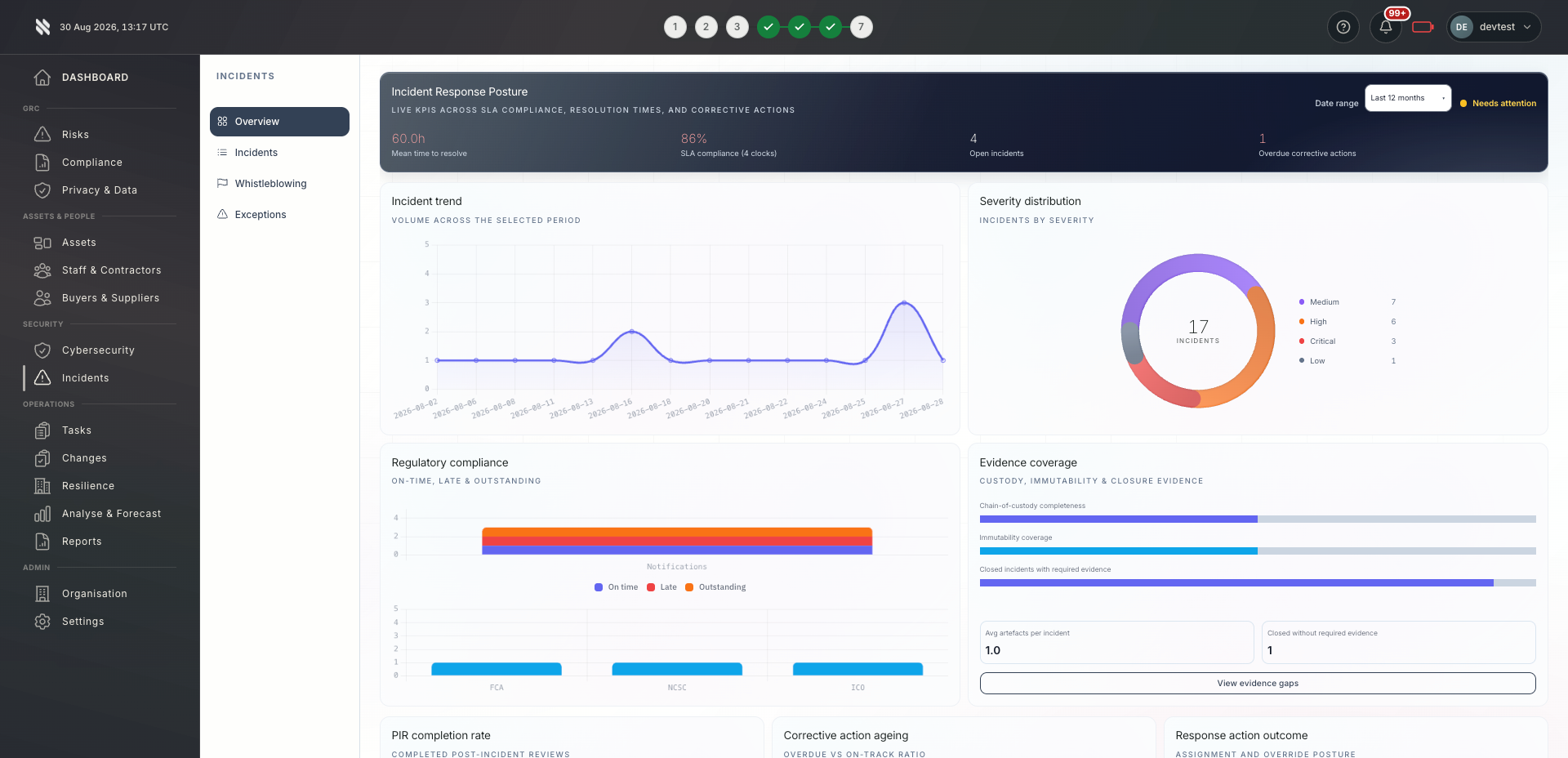
Bring delivery, oversight and assurance together without losing sight of who owns the next action.

Client incident response workflows standardised and white-labelled. Multi-client incident dashboard and portfolio breach trending.
Explore Fig for MSPs
Centralised incident coordination across teams with built-in regulatory notification checklists. Board-ready incident summaries generated automatically.
Explore Fig for organisations
Complete incident lifecycle evidence for regulatory obligations under GDPR, NIS2, and DORA. Notification compliance and response timelines auditable.
Discuss your requirementsStart with the outcomes you need. We will discuss scope, delivery and commercial terms with you before you commit.
Document roles, deputies, client boundaries, escalation contacts and the information needed for notification decisions. Keep a fallback copy accessible.
Review intake, severity, action ownership, approval points and evidence access. Confirm supported integrations and any response services separately.
Practise a scenario with the people responsible. Record decisions, communication gaps and follow-up actions, then review the updated plan.
Platform functionality and automation depend on the agreed scope, configuration and connected systems. Software supports your compliance programme; it does not replace an independent assessment or guarantee certification.
Need to discuss a specific requirement or client scenario?
Speak to FigIncidents can be reported via an in-app form, email integration, Slack commands, or automated detection rules. Severity is assigned on intake and can be adjusted as investigation evolves.
Fig Group supports notification tracking within the incident workflow. Confirm the configured deadlines, triggers and templates for your scope. The responsible organisation must decide whether reporting is required, verify the applicable deadline and retain the decision; a reminder does not determine the legal duty.
Yes. Fig Group provides template playbooks for common incident types (ransomware, data breach, phishing) that you can customise with your own escalation paths, notification lists, and evidence requirements.
Yes. MSPs can grant clients read access to their incident workspace. Clients see the investigation timeline, actions taken, and resolution status without being able to modify evidence or internal notes.
Fig Group integrates with ConnectWise, Autotask, ServiceNow, Jira, and other ticketing platforms. Incidents can be created from tickets and synced bidirectionally, so your team does not need to work in two places.
Yes. Fig Group includes anonymous case reporting for whistleblowing, increasingly required under the EU Whistleblower Directive. Cases are managed through structured workflows with full confidentiality protections.
An incident-response plan names who can act, how the team communicates, what evidence to preserve and who decides containment, notification and recovery. Adapt this template before an incident and keep a controlled copy accessible if your usual systems fail.
Use the guide and templateTell us what you would like to achieve. We will arrange a relevant conversation about the platform, your requirements and the right next step.
Continue exploring the respond capabilities, or return to the full platform overview.