Skip to content
Fig platform · prove

Staff TrainingConnected to the bigger picture.

Track training obligations, policy acknowledgements, completion evidence, exceptions and gaps against the frameworks and policies that require them.

Professional reviewing business documents
What this means for your team
  • Assign role-based training and policy acknowledgements.
  • Evidence completion, exceptions and overdue actions.
  • Identify gaps before assessment or audit.
The practical difference

Prove that people have been trained and policies have been acknowledged.

Training is assigned but not tracked. Completion rates are unknown. Refresher timelines slip. You have no evidence that staff understand their security responsibilities.

01

Assignment Workflows

Training assigned by role, location, or clearance level. Reminders escalate automatically. Progress tracked through course completion and assessment scores. Joiner-mover-leaver automation syncs with Workday, SuccessFactors, BambooHR, and ADP - new starters automatically receive training assignments, access provisioning, and policy sign-off requirements.

02

Multi-Format Content

Courses delivered as videos, interactive modules, quizzes, and phishing simulations. Content adapts based on staff role and learning history.

03

Certification Tracking

Training expiry dates managed automatically. Refresher scheduling based on framework requirements (CMMC, ISO 27001, SOC 2, DORA). Escalations trigger for approaching expirations. Integrates with KnowBe4, Moodle, and LinkedIn Learning for content delivery.

04

Compliance Evidence

Audit-ready proof of training assignment, completion, and assessment scores. Training effectiveness correlated with security incidents and compliance breaches.

Inside Fig

See the work.
Keep the evidence.

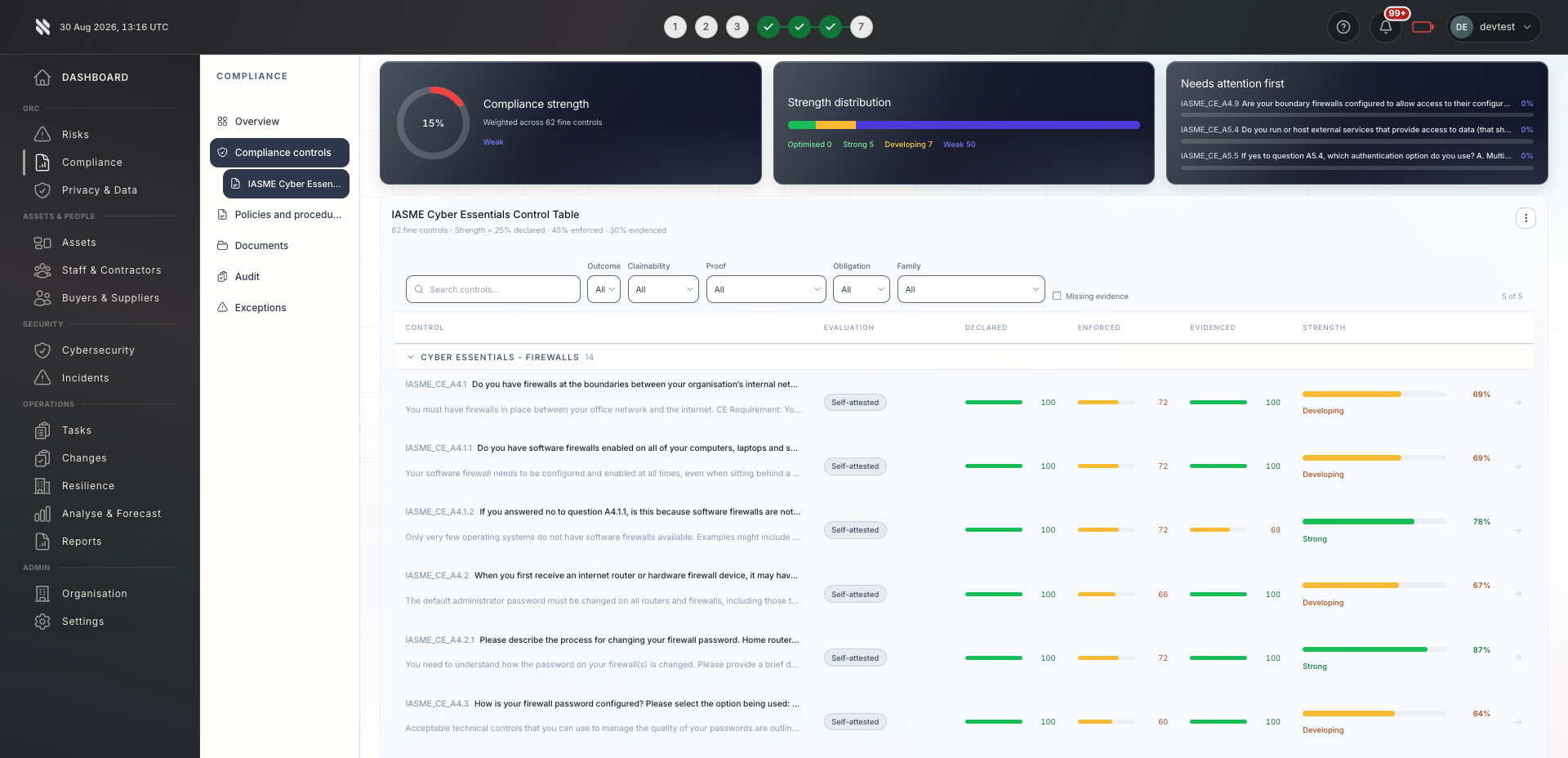
This compliance controls view shows the wider Fig environment. Ask us to demonstrate staff training against your own requirements.

A tailored walkthrough lets you review the relevant workflows, supported connections and reporting before deciding whether Fig is right for your team.

See it in a demo
Fig Cyber Essentials control table showing declared, enforced and evidenced control strength
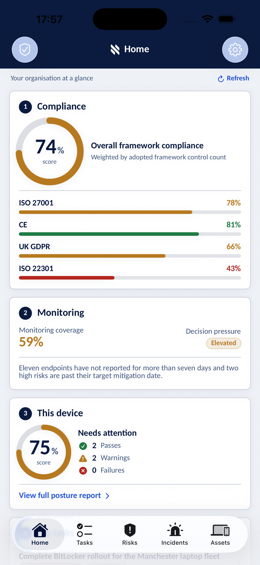
Fig mobile app Home screen showing framework compliance, monitoring coverage and device posture
Fig platform · Compliance controls
Built around your role

One platform. Different responsibilities.

Bring delivery, oversight and assurance together without losing sight of who owns the next action.

Colleagues working together with laptops in an office

MSPs & MSSPs

Standardised training programmes across all clients. Completion metrics and white-label certifications demonstrate client security posture to their customers.

Explore Fig for MSPs
Business team discussing shared priorities

In-house teams

Mandatory security training embedded into onboarding and annual compliance cycles. Training tied to role changes and incident response requirements.

Explore Fig for organisations
Reviewing business records and supporting documentation

Compliance & audit teams

Complete staff training records and assessment scores provided as evidence for security awareness and control effectiveness audits.

Discuss your requirements
A considered start

Evaluate the fit. Then agree the rollout.

Start with the outcomes you need. We will discuss scope, delivery and commercial terms with you before you commit.

  1. 1

    Tell us what matters

    Discuss your current approach to staff training, the teams involved and the requirements you need to meet.

  2. 2

    Review the workflows

    See the relevant features in a tailored demonstration. Confirm integration coverage, responsibilities and any configuration needed.

  3. 3

    Agree your next step

    Review the proposed scope and pricing. Set implementation priorities, ownership and review points around your organisation or client portfolio.

Platform functionality and automation depend on the agreed scope, configuration and connected systems. Software supports your compliance programme; it does not replace an independent assessment or guarantee certification.

Before you decide

Your questions, answered.

Need to discuss a specific requirement or client scenario?

Speak to Fig
Can we create custom training content?

Yes. You can upload custom videos, documents, and quizzes. Fig Group handles scheduling, reminders, completion tracking, and certification expiry management.

How does phishing simulation integrate with training?

Phishing simulations are assigned alongside awareness training. Results feed into analytics showing which user groups are most vulnerable and need targeted remediation.

Can we track training across multiple clients?

Yes. MSPs can manage training programmes across all client organisations from a single dashboard. Each client has isolated training records with portfolio-wide completion reporting.

What do we do about staff who repeatedly fail phishing simulations?

Fig Group automatically assigns targeted remedial training to repeat offenders. Their progress is tracked separately, and managers receive escalation reports. You can configure the threshold for what counts as a repeat failure and the remediation path that follows.

Does Fig Group provide the training content, or do we need to source our own?

Fig Group includes a built-in library of security awareness courses, phishing simulations, and compliance training modules. You can also upload your own content if you have organisation-specific material. Both types are managed through the same scheduling and tracking system.

Take the next step

See how staff training could work for you.

Tell us what you would like to achieve. We will arrange a relevant conversation about the platform, your requirements and the right next step.

  • A walkthrough focused on your priorities
  • Clarity on scope, connections and delivery
  • A discussion of pricing for your requirements

Speak to Fig

Tell us what you need. We’ll help you take the next step.

A brief message is all we need to get started.